


A factory marks white PP caps with a fiber laser. The mark comes out pale gray and hard to read. They try a CO2 laser. The edges melt. Then they test a UV laser, and the mark comes out dark and sharp, with no burn.
That is what UV laser marking is for. It marks the materials that fiber and CO2 lasers mark poorly, like glass, clear or white plastics, and circuit boards. It does this with almost no heat.
But UV is not the right buy for every shop. If you mark bare steel nameplates, a fiber laser is cheaper and faster. This guide helps you decide: a quick “buy or skip” check, a material table, how to pick 3 W, 5 W or 10 W, real prices, and a test checklist to use before you pay.
Choose UV if…
- Fiber or CO2 lasers mark your part poorly: glass, clear or white plastic
- Heat would damage the part: PCBs, chips, thin films, medical plastics
- You need very small text or tiny 2D codes
Skip UV if…
- You mark bare steel, stainless or aluminum → fiber laser
- You want black marks on anodized aluminum or color on stainless → MOPA
- You mark wood, paper, leather or cartons → CO2
What Is UV Laser Marking, in Plain Words?
UV laser marking uses 355 nm light. That is about one third of a fiber laser’s 1064 nm wavelength. The light breaks chemical bonds at the surface instead of heating it. So plastics, glass and chips get a sharp mark with almost no heat damage.
People call this “cold marking.” It is not truly cold. But the heat stays so small that the part around the mark does not melt, crack or turn yellow.

The shorter wavelength also lets the lens focus the beam into a smaller spot. A smaller spot means finer lines. HeatSign UV lasers mark lines down to about 0.01 mm. That is about a tenth of the thickness of a sheet of office paper.

- Laser sourceMakes invisible infrared light (1064 nm).
- CrystalTurns it into UV light (355 nm).
- MirrorsMove the beam fast. The part stays still.
- LensFocuses the beam into a tiny spot.
- PartUV light breaks the surface bonds. The mark forms with almost no heat.
Three words you will see
- Wavelength (nm)
- The “color” of the laser light. UV is 355 nm, fiber is 1064 nm, CO2 is 10,600 nm.
- Heat-affected zone
- The area around a mark that gets hot enough to change color, melt or crack.
- Cold marking
- Marking with so little heat that there is almost no heat-affected zone.
When Is a UV Laser Worth It, and When Is It Not?
Buy UV when fiber or CO2 lasers mark your part poorly, when heat would damage it, or when the text or barcode must be tiny. That means glass, clear and white plastics, PP and PE, ceramics, PCBs and medical plastics. For bare metal, a fiber laser is cheaper. For wood and paper, CO2 is.
Here is the simple test we use at HeatSign. Look at your part, not at the laser. Most metal parts do not need UV at all.
What you mark | Right laser | Why |
|---|---|---|
Serial numbers or QR codes on bare steel or aluminum | Fiber | Cheaper and faster. UV adds cost with no gain. |
Black marks on anodized aluminum, color on stainless | MOPA | Adjustable pulse width controls the color. |
Deep engraving in metal | Fiber deep-engraving setup | UV marks the surface only. |
White or clear plastics, PP, PE | UV | Fiber marks pale or foggy. CO2 can melt the edges. |
Glass and ceramics | UV | Clean frosted mark. CO2 can leave tiny cracks. |
PCBs, chips, flexible circuits | UV | Very small spot, almost no heat. |
Medical tubing and syringes | UV test first | No burn or yellowing on thin plastic. |
Black ABS, dark plastics | Fiber or MOPA first | Often good enough. Test before paying for UV. |
Wood, paper, leather, cartons | CO2 | The cheapest tool for these materials. |
If your list has both metal and plastic parts, look at where the volume is. Many shops buy a fiber laser for metal and add UV later, only for the parts that need it.
For a deeper side-by-side, read our guide on UV laser vs fiber laser. If color marks on metal are your main job, see the MOPA fiber laser. For wood and paper, see the CO2 laser marking machine.

Which Materials Mark Well With a UV Laser?
UV lasers work best on plastics, glass, ceramics and electronics. These are the materials where fiber lasers leave pale marks and CO2 lasers can melt or crack the surface. Bare metals can be marked lightly with UV, but a fiber laser does that job better for less money.
Why plastics? Many plastics barely absorb fiber laser light. The light passes through or just heats the surface. UV light is absorbed right at the top layer, so the mark forms where you want it.
PP and PE, the plastics in most caps, bottles and tubs, are the classic example. With an infrared laser, they often need an additive in the plastic to get a dark mark. With the right UV settings, many grades mark well without one. Keyence, a large laser maker, says the same in its plastic marking guides.


Material | What the mark looks like | Watch out for |
|---|---|---|
PP, PE (white or natural) | Dark gray to black, sharp edges | Grade and color change results. Test your exact batch. |
ABS, PC, PET | High contrast, smooth surface | Some colors fade the contrast. Test first. |
Clear plastics (PC, PMMA) | Clean mark, no fog around it | Shows best on a dark background. |
Glass, quartz | Frosted white mark, no cracks | Very thin glass: start at low power. |
Ceramics (alumina, zirconia) | Dark, clear mark | Glazed surfaces vary. Test. |
PCBs, solder mask | Fine text and small barcodes | Keep power low near copper traces. See the PCB laser marking machine guide. |
Chips and electronic parts | Tiny text and barcodes on small bodies | Check they read on your scanner. |
Silicone, medical tubing | Clear mark, no burn | Test after cleaning or sterilization. |
Coated or anodized metal | Light, clean mark on the coating | Fiber or MOPA is usually cheaper. |
Bare steel, stainless | Light surface mark only | Not recommended. Use fiber. |
One more tip. The same plastic in two colors can mark very differently. A white PP cap may mark black and clear. A blue one may give weak contrast. Always test the colors you actually sell.
The video shows one HeatSign UV machine marking several materials in a row: plastic, glass and more. Watch how the mark looks on each surface.
3 W, 5 W or 10 W: How Much UV Power Do You Need?
Power sets speed, not what the laser can mark. A 5 W UV laser suits most small parts. For long, steady shifts, choose water cooling, which HeatSign offers at both 5 W and 10 W. Pick 10 W for big batches or larger marking areas. 15 W, 20 W and in-line setups are quoted separately.
Think of power like the size of an engine. A small engine still gets you there, just slower. A 3 W UV laser can mark the same PP cap as a 10 W one. It just takes longer per part.
3 W
Small jobs and labs
Tiny parts, low volume, lab or R&D work. The lowest price.
Most buyers
5 W
Everyday marking
Small parts, barcodes and logos at normal speed. Air-cooled or water-cooled. Pick water cooling if it runs for hours every day.
10 W
Production lines
Bigger batches, larger marks, faster cycle times. Water-cooled.
15–20 W
Quoted per project
High-speed lines, flying marking on a moving conveyor, custom fixtures or enclosures.
Air-Cooled or Water-Cooled?
A UV laser source is sensitive to heat. When it gets warm, the output power can drift, and the mark gets lighter. Water cooling keeps the temperature steady. That is why we recommend water cooling for stable, all-day work, even at 5 W.
Cooling | Good for | Trade-off |
|---|---|---|
Air-cooled | Short runs, sample rooms, a few hours a day | Smaller and cheaper. Power can drift on long runs. |
Water-cooled (5 W or 10 W) | Long shifts, production, steady mark quality | Needs a small chiller and basic chiller care. |
What Does a UV Laser Marking Machine Cost?
At HeatSign, standard UV laser marking machines cost $3,000–5,900. The price depends on power, cooling and options like a rotary axis. Flying setups for production lines, custom designs, and 15 W or 20 W machines cost more and are quoted per project.
Why does UV cost more than fiber? A UV source starts with infrared light. Extra optics then turn it into 355 nm light, and those optics add cost. A desktop fiber laser for metal starts lower, from about $1,950.

 UV Laser Marking Machine, 3–10 WDesktop models for plastics, glass and PCBs. 5 W comes air- or water-cooled. $3,000–5,900.View machine →
 Flying Laser Marking MachineMarks parts on a moving line. UV version available. Quoted per project.View machines →
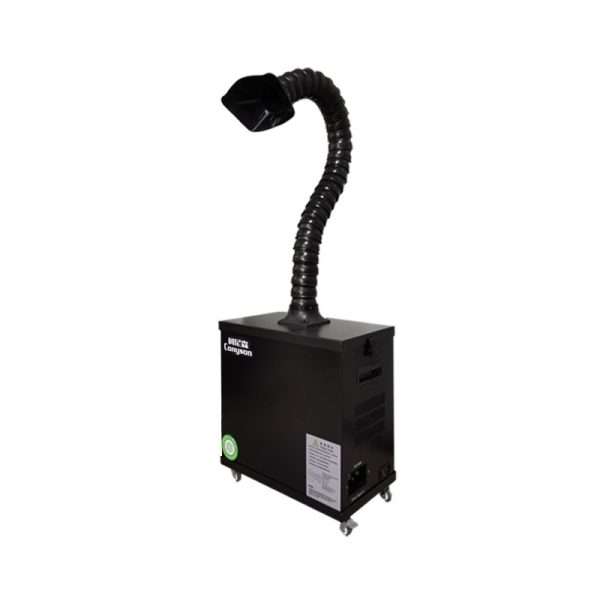 Industrial Laser Fume ExtractorRemoves the smoke and fine dust from marking plastics.View extractor →
What Should You Test Before You Buy a UV Laser?
Test your own parts, not the supplier’s samples. Mark the exact material, color and batch you use. Then check the contrast, the time per part, and how the mark holds up after cleaning. A photo of a nice sample on someone else’s plastic proves very little.
We see the same mistake often. A buyer approves a machine from a sample photo. Then their real part, in a different color or grade, marks pale. Use this checklist with any supplier, HeatSign included.
Before you pay: 9 things to check
- Marked on my material, same color and same batch
- Contrast is clear by eye and reads on my scanner
- 2D codes graded, if my customer checks grades (A–F)
- Time per part measured, not guessed
- Mark still there after cleaning, alcohol wipe or sterilization
- No burn, yellowing, melting or cracks around the mark
- Smoke level checked (plan a fume extractor for plastics)
- Quote lists the laser source brand, model and power
- Air or water cooling written into the quote
If your customer grades barcodes, read readable vs verifiable Data Matrix codes (ISO 29158). A barcode that scans is not always one that passes.

Not sure UV is the right tool?
Send us your part and your target. We will tell you if UV fits, and which power and cooling match your output.
What Does a UV Laser Cost to Own and Run Safely?
Running costs are low. There is no ink and no consumables. Plan for lens cleaning, chiller care on water-cooled units, a fume extractor for plastics, and safety glasses rated for 355 nm. Glasses made for fiber lasers (1064 nm) do not protect you from UV.
Item | Why you need it | Note |
|---|---|---|
Fume extractor | Plastics give off smoke and fine dust when marked | Needed for most plastic jobs |
Safety glasses for 355 nm | Open UV machines are Class 4 lasers | Check the label says 355 nm |
Chiller care | Water-cooled units need clean water | Change the water and check the filter on a schedule |
Lens cleaning | Dust and smoke reduce mark quality | A few minutes, a few times a month |
A common trap: a shop already has fiber laser glasses and uses them with the new UV machine. They look the same. They are not. Buy glasses rated for the 355 nm wavelength. Our guide on OD4 vs OD6 safety glasses explains optical density. It covers 1064 nm, but the rules for reading the label are the same. For the basics of laser hazards, see OSHA’s laser hazards page.
HeatSign laser machines ship with a CE declaration, independently verified by ICR Polska (EU Notified Body No. 2703). That covers the machine. Eye protection and fume control in your shop are still your side.
UV Laser Marking FAQ
Can a UV laser mark metal?
Yes, but only lightly. It can make a light surface mark on bare or coated metal. For deep, dark or fast marks on metal, a fiber laser does better and costs less.
Will glass crack under a UV laser?
Usually not. A UV laser removes a very thin surface layer and leaves a frosted white mark. A CO2 laser heats the glass more and can leave tiny cracks.
Will a UV mark survive sterilization?
Usually yes, because the mark is part of the material, not ink on top. For parts sterilized many times, test samples through your real process first.
Why does a UV laser cost more than a fiber laser?
A UV source starts as infrared light. Extra optics turn it into 355 nm light, and those parts add cost. That is why a UV machine costs more than a fiber laser of the same power.
Is UV or green laser better for 3D crystal engraving?
For fast engraving inside crystal, most shops use a green laser. See our guide on green vs UV laser for 3D crystal.
Where to Start
The most common mistake we see is buying UV because it sounds “high-end,” then using it to mark stainless steel nameplates. That job needs a fiber laser at about half the price.
So decide in this order. First, the material: does fiber or CO2 mark it poorly? Then the output: how many parts, how many hours a day? That sets the power and cooling. Last, test with your own parts before you pay.
Tell us what you mark and how many parts per day. HeatSign will suggest the right laser, even if it is not UV.
Sources
- Keyence, “UV Laser Marking” and “Laser Marking on Plastic”
- IEC 60825-1, Safety of laser products
- OSHA, Laser Hazards
- ISO/IEC 29158, Direct Part Mark (DPM) quality guideline
- HeatSign UV laser marking machine specifications



Thank you for another informative blog. Where else could I get that type of info written in such a perfect way? I have a project that I am just now working on, and I’ve been on the look out for such information.
I like this blog, thank you for sharing!